What Lives Inside an LLM's Context Window
A language model can only respond to the text sitting right in front of it. That text is the context window — its short-term working memory. Once you can see what's inside it, almost every "weird" thing an AI does suddenly makes sense.

If you've ever wondered why a chatbot remembers your name for an hour and then completely forgets it, or why pasting a document magically lets it answer questions it couldn't a second ago — you're really asking one question:
What can the model actually see right now?
The answer is the most useful thing we can learn about AI. So let's walk through it together, slowly, with pictures. By the end you'll have a mental model you can lean on for everything from chatting to building your own AI apps.
1. The mental model: a working desk
Imagine the model as someone sitting at a desk, ready to help. Whatever you place on that desk — instructions, notes, your question — is everything they have to work with. They can't recall a meeting from last week, and they can't wander off to a library. They just look at the desk and respond.
That desk is the context window: the full block of text a model reads before it writes a single reply.
If something isn't in the context window, the model genuinely has no idea it exists.
Don't confuse this with training. Training is the model's long-term, baked-in knowledge — like things you've memorized over a lifetime. The context window is its short-term scratchpad for this conversation. Different memories, different rules. This article is about the scratchpad.
2. What actually gets sent to the model
When you hit send, the model almost never receives just your words. Behind the scenes, several pieces of text get gathered up and stitched into one big message. Then that whole bundle is what the model reads.
Five ingredients get assembled into one prompt — and a sixth, the reply itself, loops back in as it's written.
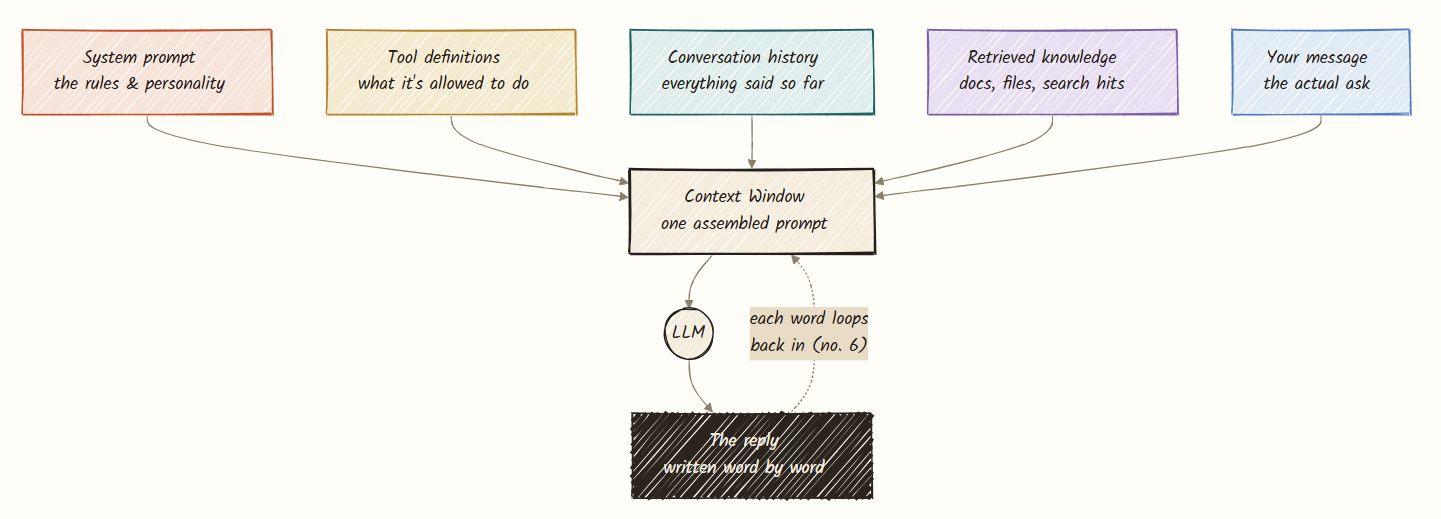
So the message you typed is only one slice of what arrives. The other pieces are added for you, usually invisibly. Let's meet them one at a time — they're each genuinely useful to understand.
The system prompt — its job description
Before you say anything, the developer hands the model a set of standing instructions: who it's meant to be, how to behave, what's off-limits. You rarely see this text, but it quietly colors every answer.
# a (simplified) system prompt for a banking assistant
You are Ava, a friendly banking assistant.
Be warm and concise.
Never reveal a balance without verifying identity.
If asked about loans, hand off to a human.
This is why the very same underlying model can feel like a buttoned-up banker in one app and a goofy game character in another. The brain didn't change — the instructions on top of it did.
Your current message — the part you own
This is the question or request you just sent. It's the one ingredient you control directly every time, which is exactly why writing clear, specific messages matters so much. (That craft has a name: prompt engineering.)
That leaves four ingredients worth meeting properly — history, knowledge, tools, and the model's own reply-in-progress — so let's keep going.
3. Why it "remembers" — and why it forgets
Here's something that trips up nearly everyone. A language model is stateless: each request starts from a blank slate. It has no built-in memory of the previous thing it told you.
So how does a chatbot stay coherent across a long conversation? Simple, and a little sneaky: the app quietly re-sends the entire conversation so far with every new turn. The model isn't recalling your earlier messages — it's reading them again, fresh, each time.
The "memory" is really the full transcript being replayed on every turn.
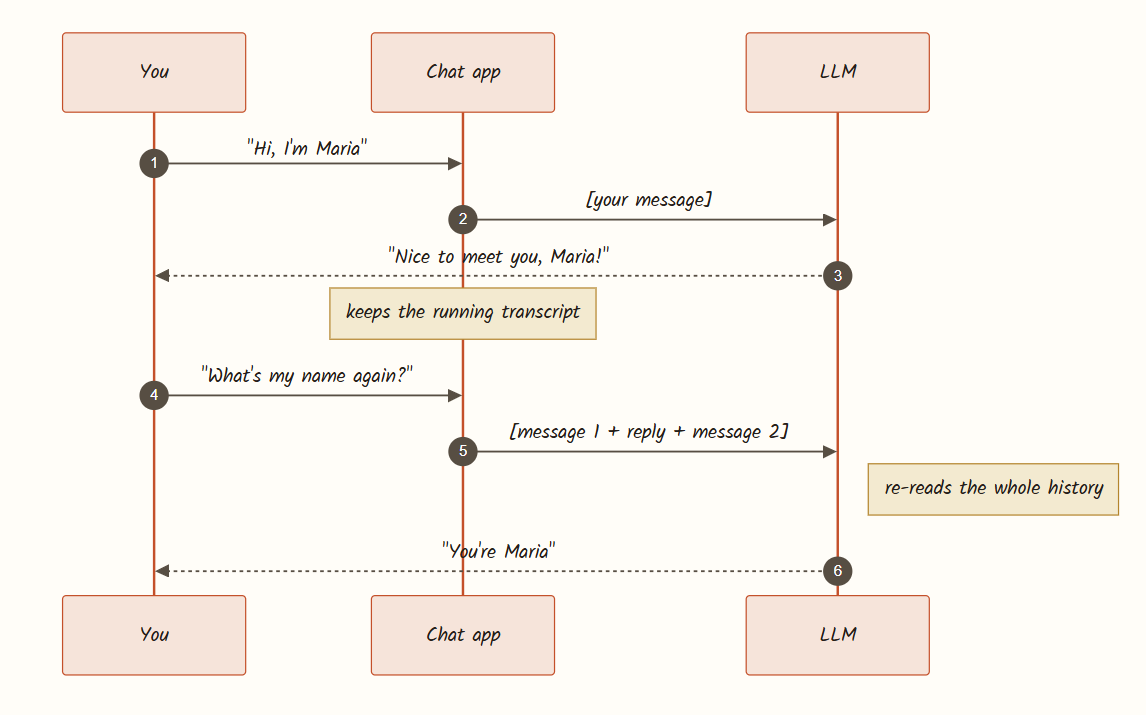
This explains two everyday experiences at once. It's why a chatbot can refer back to something you said twenty messages ago — that message is still riding along. And it's why opening a brand-new chat wipes the slate completely: none of that history gets carried over, so it starts fresh as a stranger.
Some products add a separate "memory" feature on top of this. That isn't the model remembering on its own — it's the app deliberately tucking a few saved notes back into the context for you. Same mechanism, just automated.
4. Giving it knowledge it never trained on
A model's training is frozen at some cut-off date, and it obviously never saw your private files. So how can it answer questions about a contract you signed last week, or your company's internal handbook?
You put the relevant text in front of it. Sometimes you do this yourself by pasting or uploading. Often a system does it for you automatically, fetching just the snippets that match your question — a popular pattern called RAG (Retrieval-Augmented Generation).
RAG in one glance: find the right text, drop it in, then ask:
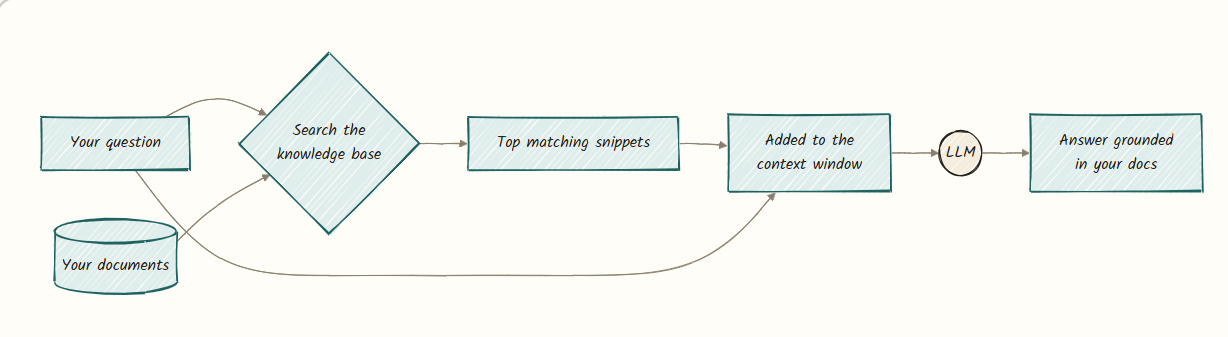
The takeaway is reassuringly logical. The model can suddenly discuss your rental contract not because it "learned" it, but because the relevant clause is now part of what it's reading. New knowledge becomes available the moment it lands in the window — and only for as long as it stays there.
5. Letting it actually do things
On its own, a model can only produce text. It can't check today's weather or look up your order — those facts simply aren't in its training. To bridge that gap, we describe tools it's allowed to use, right inside the context. Each description says what the tool is called and what it needs. The model then decides when to reach for one.
With a tool described in context, the model can fetch live facts and fold them into a natural reply.
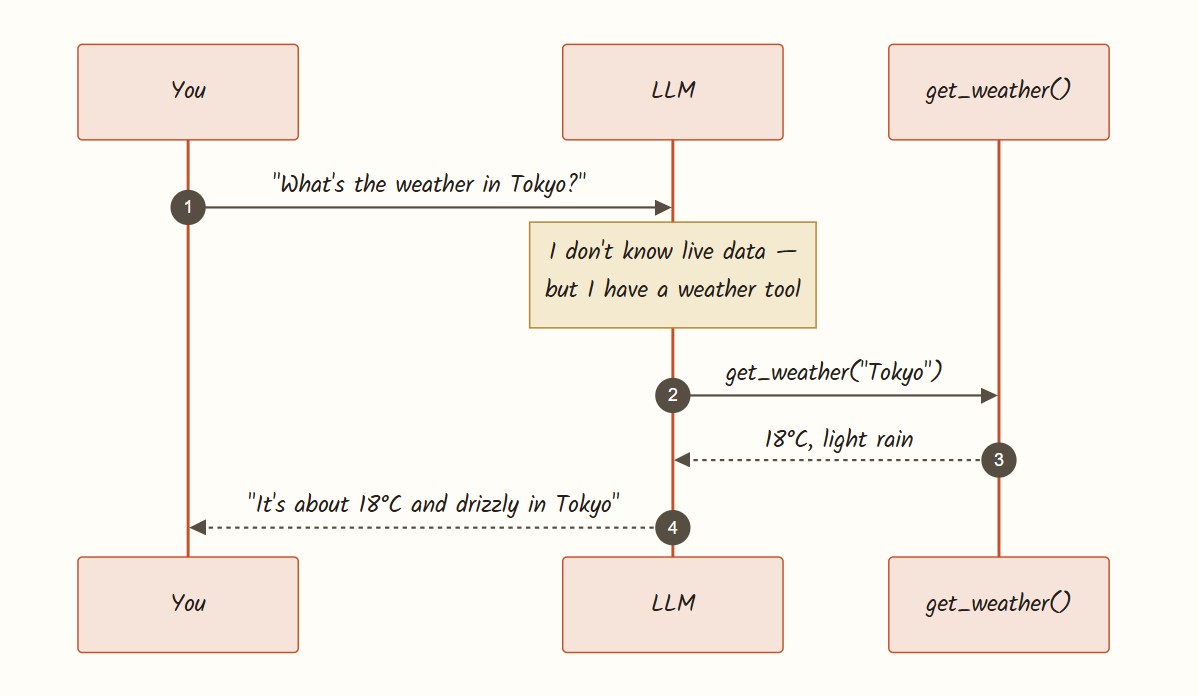
No tool description means no live weather — the model would just admit it can't know. The ability to act always traces back to what's been made available in the window.
6. The model reads its own answer as it writes
A language model doesn't compose a whole reply in its head and then dump it out. It writes one token at a time, and every token it produces is immediately added back into the context window before it picks the next one. In other words, the model is constantly reading its own answer-so-far.
That feedback loop is the dotted arrow in the diagram near the top of this article. The reply isn't just an output — while it's being written, it's also input for the words that follow.
This sounds like a technical footnote, but it explains a trick you've probably already used:
"Let's think step by step."
When you ask a model to reason out loud, it writes down its intermediate steps — and because those steps loop back into the window, the model can literally read its own working before committing to a final answer. It's the difference between blurting out a guess and showing your work on paper so you don't lose your place.
Real-world example
Ask a model to solve a word problem and answer in one word, and it'll often slip up. Ask it to "work through it step by step first," and accuracy jumps — not because it got smarter, but because each reasoning step it wrote became fresh context guiding the next one. Same model, better scaffolding on the desk.
It also has a practical flip side. Because the reply shares the same finite space as everything else, a very long answer competes with everything already in the window — and once the model writes something, that text influences the rest of the response. A confident wrong turn early in an answer can quietly steer the rest of it. Asking for a brief plan before a long output is often the cleaner path.
7. Tokens: how the space is measured
So far I've talked about "text" loosely. But models don't read words the way we do — they read tokens. A token is a chunk of text: often a whole short word, sometimes just a piece of a longer one. Here's how a sentence might get sliced up, one box per token: (Reference: https://platform.openai.com/tokenizer)
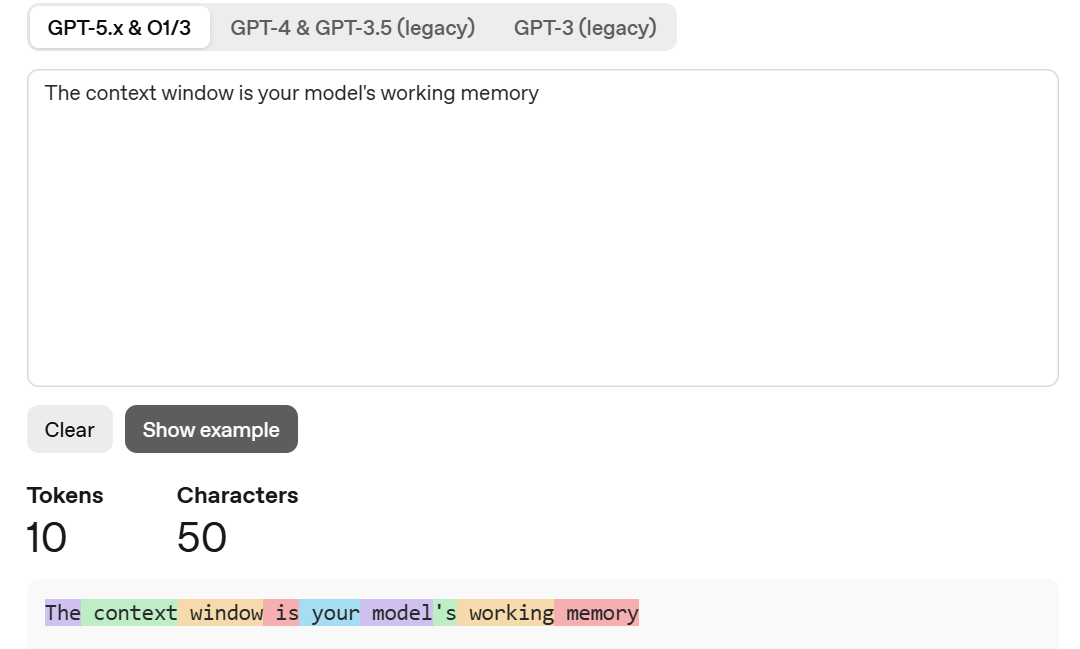
Why chop words into pieces? Because reusable sub-word chunks let a model handle anything you throw at it — a brand name, a typo, a word in another language — by building it from familiar parts. A handy rule of thumb for English: one token is roughly ¾ of a word, so about 1,000 tokens ≈ 750 words.
This is also the secret behind that famous "how many R's in strawberry?" stumble. The model never sees individual letters — the word was already bundled into tokens before it looked. It's reasoning about chunks, not spelling.
When you read that a model has a "200K-token context window," that's the size of the desk: about 200,000 of these chunks total — shared across the system prompt, the history, your documents, your message, and the reply it writes back.
8. The window has a hard edge
Here's the catch that ties everything together: that space is finite, and every ingredient competes for the same pool. A long system prompt plus a big uploaded document leaves less room for conversation history — and less room for the answer itself.
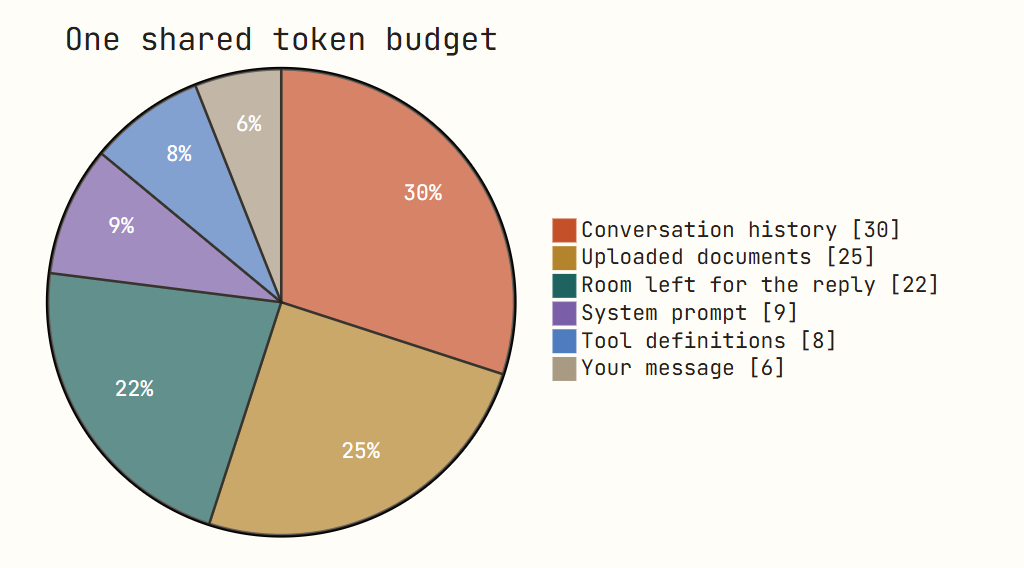
Everything shares one budget. Fill it with documents, and there's less room to think and reply.
When a conversation finally outgrows the limit, something has to give. Most systems quietly trim or summarize the oldest messages to make room. So when a long chat suddenly contradicts a detail from way back — it isn't being careless. That early message slid off the edge.
If this happens to you, Don't argue with the model — just paste the important detail back in. The moment it's in the window again, the model can use it. You're topping up the desk, not jogging a memory.
Two things the experts watch for
A couple of deeper details are worth knowing, even as a beginner, because they shape good habits.
Bigger isn't free. Inside the model, a mechanism called attention lets every token weigh every other token to decide what matters — that's a big part of why these models feel so context-aware. But that comparison grows with roughly the square of the token count: double the context, and the work can quadruple. Long prompts are slower and pricier, so "paste everything just in case" isn't always wise.
The middle gets the least attention. Studies have found models pay closest attention to the start and end of a long context, and can skim over things buried in the middle. So if a fact really matters, put it near the top or the bottom — not stranded in the center of a huge wall of text.
9. Myths worth unlearning
It remembers all our past conversations. | MYTH |
It only knows what's re-sent into the current context. A new chat is a clean slate — unless a memory feature deliberately adds old notes back. | TRUTH |
"It can browse the internet by default." | MYTH |
Only if a search tool is described in its context and it chooses to use it. Otherwise it answers from frozen training knowledge. | TRUTH |
"A bigger context window means a smarter model." | MYTH |
It means a bigger desk, not a better mind. Intelligence comes from training; the window just sets how much it can hold at once. | TRUTH |
"If I told it once, it knows it forever." | MYTH |
Only while that text stays in the window. Long chats trim old turns; new chats start empty. When in doubt, restate it. | TRUTH |
Wrapping up
If you remember just one thing, make it the desk. The model responds to what's in front of it — no more, no less. Conversation history, uploaded files, tool descriptions, your question: they all become "real" to the model only by entering that finite, token-counted space, and they fade the moment they leave it.
Hold that picture, and the AI you use every day stops feeling like magic and starts feeling like something you understand. That's a great place to build from.
If this helped a concept click, that's exactly what I was hoping for. Go put something interesting on the desk.
About the author
- Breaking down complex systems into core principles. Exploring the intersection of Software Engineering, Data, and AI.
Comments
Join the discussionNo comments yet. Be the first to comment.
Practical AI Learning
Bridging the gap between AI theory and real-world implementation. This series explores the end-to-end machine learning lifecycle—covering data preprocessing, supervised and unsupervised learning, neural networks, and model deployment. Each guide focuses on building functional AI solutions using industry-standard frameworks like Scikit-Learn, TensorFlow, and PyTorch.


